Inside the toolkit
See it in practice
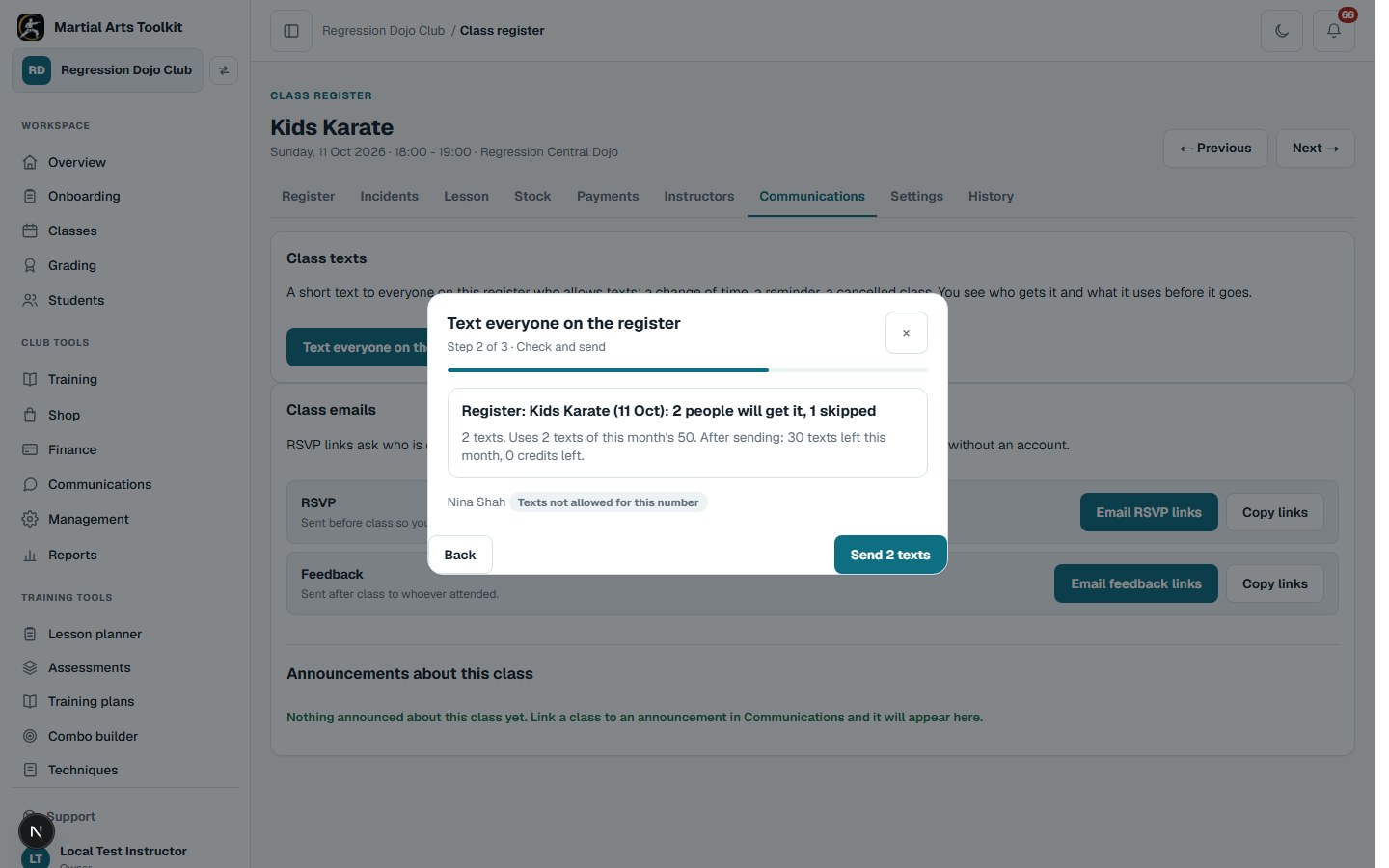
A local example club: the pop-up says who gets the text and what it uses of the month's allowance before anything is sent.
A practical approach
Make it part of the way your club works
Texts are on unless switched off
Every UK mobile on your records can be texted, with no tick to chase. Anyone can switch texts off on their record or on the portal, and a reply of STOP stops them for good. Under-18s are texted through a parent or guardian, never on their own number.
Write it, check it, send it
From a register, a student record or Communications > Texts, write a short message. Check who gets it: the preview lists everyone, says who is skipped and why, and shows how many texts the send uses and how many are left this month. Then send. Delivery shows in Text history as the network reports back.
Let the routine texts go on their own
Under Automatic texts, switch on class reminders (with how long before), cancellations, check-in notices to parents of under-18s, trial bookings and grading bookings. Nothing goes between 20:30 and 07:30 in the club's own time, except a cancellation within three hours of the class.
Worked example
One cancelled class, three different households
An illustrative register of three students shows how the same text reaches each household. The example club's plan includes 50 texts a month.
| Person on the register | Where the text goes | Counted as |
|---|---|---|
| Amelia, 14 | Her parent's number, because she is under 18 | 1 text |
| Ethan, 23 | His own number, which allows texts | 1 text |
| Priya, 9 | Nobody: no number on her record allows texts yet | Skipped, nothing used |
Keep the context
Keep texts short and useful
Texts work best for things people need to know now: a cancelled class, a change of time or venue, a reminder the day before a grading. Put anything longer in an announcement or an email, and link to the app rather than another website.
Texts are for club business only. Keep marketing, medical detail and payment detail out of them. People cannot reply to a text from the club, so say how to get in touch if you need an answer.
Before you start
Questions club owners ask
What does texting cost?
Each paid plan includes a monthly allowance of texts: Basic 50, Advanced 100, Max 200. Extra texts are 100 for £4 as credits that never expire, with an optional auto top-up so a reminder is never held back. Included texts do not carry over to the next month.
Can people reply?
No. Texts come from a sender name rather than a number, so replies are not received. Say how to get in touch in the text if you need an answer.
Can texts come from our club's name?
Yes. Every club texts from the shared name MAToolkit with the club's name at the start of each text. For a one-off £10 set-up a club can have its own sender name, registered with the network.
Is a text recorded anywhere?
Every text, hand-written or automatic, is noted on each student's record under Audit history, and the club's Text history shows every send with who it reached and whether it was delivered.
Try it with your own club
Less time on administration.
More time to teach.
Create your club free today and explore the workflow. Compare plans as your club grows.